---
title: Setting up Two-Factor Authentication (2FA)
description: Learn how to enable two-factor authentication (2FA) in systemHUB to add an extra layer of security using an authenticator app and backup codes.
---
[Skip to content](https://kb.systemology.com/help-center/setting-up-two-factor-authentication-2fa#main-content)
English
Show submenu for translations
![1000X162.png\]](https://kb.systemology.com/hs-fs/hubfs/1000X162.png?width=250&height=43&name=1000X162.png)
Open main navigation
Close main navigation
- English
Show submenu for translations
- [www.systemHUB.com](https://www.systemhub.com/)
[www.systemHUB.com](https://www.systemhub.com/)
How can we help?
- There are no suggestions because the search field is empty.
1. [Help Center](https://kb.systemology.com/help-center?hsLang=en)
2. [Profile & Settings](https://kb.systemology.com/help-center/profile-settings?hsLang=en)
3. [Account Security & Access](https://kb.systemology.com/help-center/profile-settings?hsLang=en#account-security-access)
# Setting up Two-Factor Authentication (2FA)
## Learn how to enhance your account security by enabling Two-factor authentication (2FA), saving your critical backup codes, and managing your ongoing login requirements.
---
### **🔒 What is Two-Factor Authentication?**
Two-factor authentication (2FA) adds a second login step beyond your password. After you sign in, systemHUB will ask for a 6-digit code from your authenticator app.
We strongly recommend enabling 2FA for anyone with Admin or Account Owner access to ensure your company's operational data remains fully secure.
---
### **🚀 How to Enable 2FA**
1. Click your **Profile Icon** in the top right-hand corner of the screen and select the **2FA** tab.
2. Choose **Enable 2FA**.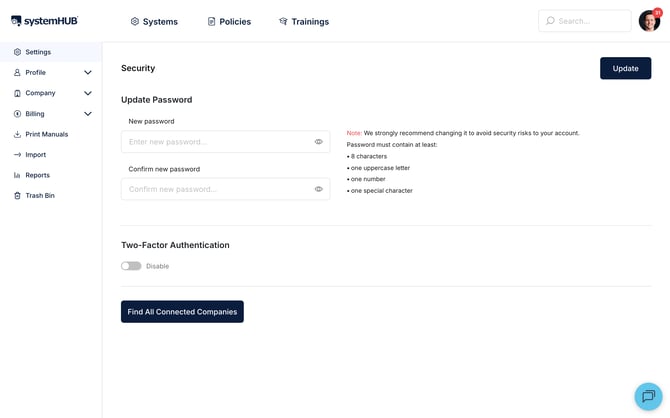
3. Scan the displayed QR code with a trusted authenticator app, such as Google Authenticator, Authy, 1Password, or any standard TOTP app.
4. Enter the 6-digit code currently shown on your app.
5. Save your backup codes immediately to ensure you can still log in if you lose your phone.
Once enabled, every future login will prompt you for a fresh authentication code right after you enter your password
---
### **🔑 Backup Codes (Crucial Action Item)**
When you set up 2FA, systemHUB will show you a unique set of backup codes. These are single-use codes you can enter instead of an authenticator app code if you ever lose access to your phone.
- **Save them somewhere safe:** A secure password manager is ideal.
- **The risk:** Without backup codes and without your phone, recovering access to your profile requires Account Owner intervention.
---
### **🔄 Disabling 2FA**
If you ever need to turn off this security layer, you can disable 2FA from the exact same profile screen. However, to keep your account safe from unauthorized entry, we highly recommend keeping it turned on.
---
### **🎉 You're All Set!**
Your account is now securely locked down with an extra layer of protection. By keeping your authentication app handy and your backup codes stored safely, your systemHUB profile remains highly secure.
- [Getting Started](https://kb.systemology.com/help-center/getting-started?hsLang=en)
- [Profile & Settings](https://kb.systemology.com/help-center/profile-settings?hsLang=en#main-content)
- [Profile Setup & Onboarding](https://kb.systemology.com/help-center/profile-settings?hsLang=en#profile-setup-onboarding)
- [Account Security & Access](https://kb.systemology.com/help-center/profile-settings?hsLang=en#account-security-access)
- [Notifications & Preferences](https://kb.systemology.com/help-center/profile-settings?hsLang=en#notifications-preferences)
- [Admin & Billing](https://kb.systemology.com/help-center/admin-billing?hsLang=en#main-content)
- [Team & User Management](https://kb.systemology.com/help-center/admin-billing?hsLang=en#team-user-management)
- [Subdomain & Organization Settings](https://kb.systemology.com/help-center/admin-billing?hsLang=en#subdomain-organization-settings)
- [Billing & Subscriptions](https://kb.systemology.com/help-center/admin-billing?hsLang=en#billing-subscriptions)
- [Permissions & Roles](https://kb.systemology.com/help-center/permissions-roles?hsLang=en)
- [Building Content](https://kb.systemology.com/help-center/building-content?hsLang=en)
- [Working With Content](https://kb.systemology.com/help-center/working-with-content?hsLang=en#main-content)
- [Tagging & Organization](https://kb.systemology.com/help-center/working-with-content?hsLang=en#tagging-organization)
- [Content & Collaboration Tools](https://kb.systemology.com/help-center/working-with-content?hsLang=en#content-collaboration-tools)
- [Limits & Specifications](https://kb.systemology.com/help-center/working-with-content?hsLang=en#limits-specifications)
- [Training](https://kb.systemology.com/help-center/training?hsLang=en)
- [Reports & Compliance](https://kb.systemology.com/help-center/reports-compliance?hsLang=en)
- [Integrations & API](https://kb.systemology.com/help-center/integrations-api?hsLang=en)
- [Troubleshooting](https://kb.systemology.com/help-center/troubleshooting?hsLang=en#main-content)
- [Technical Requirements & Compatibility](https://kb.systemology.com/help-center/troubleshooting?hsLang=en#technical-requirements-compatibility)
- [Cache, Performance & Errors](https://kb.systemology.com/help-center/troubleshooting?hsLang=en#cache-performance-errors)
- [Status, Requests & Affiliate Program](https://kb.systemology.com/help-center/status-requests-affiliate-program?hsLang=en#main-content)
- [Affiliate Program](https://kb.systemology.com/help-center/status-requests-affiliate-program?hsLang=en#affiliate-program)
- [Legal & Security](https://kb.systemology.com/help-center/legal-security?hsLang=en#main-content)
- [Policies & Terms](https://kb.systemology.com/help-center/legal-security?hsLang=en#policies-terms)
[](https://www.SYSTEMology.com/)
Copyright © 2026, SYSTEMology / systemHUB