---
title: Assigning content to a Role vs an individual member
description: Learn when to assign content to specific members vs Roles or Member Groups in systemHUB, including best practices for scalable team access.
---
[Skip to content](https://kb.systemology.com/help-center/assigning-content-to-a-role-vs-an-individual-member#main-content)
English
Show submenu for translations
![1000X162.png\]](https://kb.systemology.com/hs-fs/hubfs/1000X162.png?width=250&height=43&name=1000X162.png)
Open main navigation
Close main navigation
- English
Show submenu for translations
- [www.systemHUB.com](https://www.systemhub.com/)
[www.systemHUB.com](https://www.systemhub.com/)
How can we help?
- There are no suggestions because the search field is empty.
1. [Help Center](https://kb.systemology.com/help-center?hsLang=en)
2. [Permissions & Roles](https://kb.systemology.com/help-center/permissions-roles?hsLang=en)
# Assigning content to a Role vs an individual member
## Learn how to strategically assign systemHUB documentation to specific members or business functions, combine assignments for clear ownership, and streamline user access across growing teams.
---
### **👥 Assigning to a Role or Member Group**
When you assign a system, policy, or training, you have two choices, you can assign it to a Role or Member Group, or assign it to specific members. The right choice depends on whether the assignment is about the function or the individual.
You should assign documentation to a Role or Member Group when the system is tied directly to a business function, not a specific person.
**Examples:**
- **"Daily standup process"** -\> Assign to the **Sales Team**
- **"Onboarding checklist"** -\> Assign to the **HR Group**
- **"Code review standards"** -\> Assign to **Engineering**
When you add a new person to that group, they automatically inherit every system already assigned to it. When someone leaves the group, they lose access automatically, resulting in significantly less manual admin work over time.
---
### **👤 Assigning to a Specific Member**
You should assign documentation to a specific individual when the system is tied entirely to one person's unique position.
**Examples:**
- **"Bookkeeping handoff"** -\> Assign to your specific bookkeeper
- **"CEO morning routine"** -\> Assign to Dave
- **"Quarterly board prep"** -\> Assign to your CFO
> ⚠️ **The Admin Cost:** If that specific person leaves the business, you will need to reassign the documentation manually. That is the cost of person-specific assignment.
---
### **🎛️ The Ideal Pattern: Combining Both**
Most systems inside your workspace should be assigned to an entire Role or Group, while also maintaining a designated Owner for accountability.
- **Owner:** The one person responsible for keeping the system accurate and up to date.
- **Secondary Owner:** The backup person.
- **Assigned Roles / Member Groups:** The specific teams that need to read and follow the process.
- **Assigned Members:** Anyone else who needs access but is not part of the relevant department.
### **Real-World Example: Sales Onboarding Process**
A standard sales process would be configured with these exact layered permissions:
- **Owner:** Head of Sales
- **Secondary Owner:** Sales Operations Manager
- **Assigned Role / Member Group:** Sales Team (everyone who needs to read and follow it)
- **Assigned Members:** HR Manager (who is not in the Sales department but requires visibility)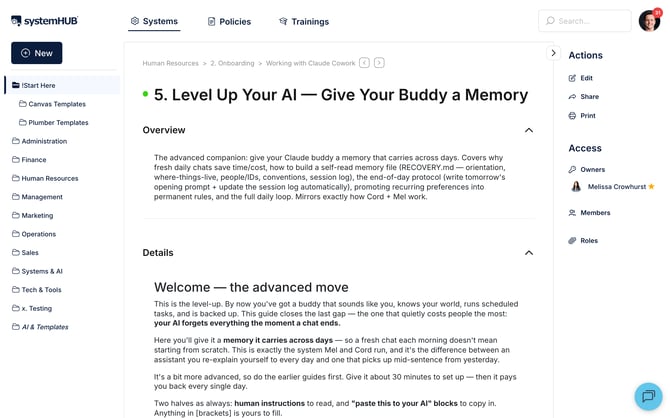
---
### **🚨 Things to Watch Out For**
- **Avoid "All Members" overload:** Assigning everything to everyone feels easy but creates platform noise. Team members will stop reading notifications if they feel every alert is irrelevant to their daily tasks.
- **Group repetitive assignments:** If you find yourself manually assigning the exact same set of five people to multiple documents, take a moment to create a dedicated Member Group for them instead.
- **Scale with Roles:** Group-based and Role-based assignments are much easier to maintain at scale. If your team has 30+ people, default to group assignment unless there is a highly specific reason not to.
---
### **🎉 You're All Set!**
You now understand how to efficiently distribute documentation across your business. By defaulting to group-based assignments and locking in clear individual owners, you can keep your systemHUB workspace highly organised and perfectly automated.
- [Getting Started](https://kb.systemology.com/help-center/getting-started?hsLang=en)
- [Profile & Settings](https://kb.systemology.com/help-center/profile-settings?hsLang=en#main-content)
- [Profile Setup & Onboarding](https://kb.systemology.com/help-center/profile-settings?hsLang=en#profile-setup-onboarding)
- [Account Security & Access](https://kb.systemology.com/help-center/profile-settings?hsLang=en#account-security-access)
- [Notifications & Preferences](https://kb.systemology.com/help-center/profile-settings?hsLang=en#notifications-preferences)
- [Admin & Billing](https://kb.systemology.com/help-center/admin-billing?hsLang=en#main-content)
- [Team & User Management](https://kb.systemology.com/help-center/admin-billing?hsLang=en#team-user-management)
- [Subdomain & Organization Settings](https://kb.systemology.com/help-center/admin-billing?hsLang=en#subdomain-organization-settings)
- [Billing & Subscriptions](https://kb.systemology.com/help-center/admin-billing?hsLang=en#billing-subscriptions)
- [Permissions & Roles](https://kb.systemology.com/help-center/permissions-roles?hsLang=en)
- [Building Content](https://kb.systemology.com/help-center/building-content?hsLang=en)
- [Working With Content](https://kb.systemology.com/help-center/working-with-content?hsLang=en#main-content)
- [Tagging & Organization](https://kb.systemology.com/help-center/working-with-content?hsLang=en#tagging-organization)
- [Content & Collaboration Tools](https://kb.systemology.com/help-center/working-with-content?hsLang=en#content-collaboration-tools)
- [Limits & Specifications](https://kb.systemology.com/help-center/working-with-content?hsLang=en#limits-specifications)
- [Training](https://kb.systemology.com/help-center/training?hsLang=en)
- [Reports & Compliance](https://kb.systemology.com/help-center/reports-compliance?hsLang=en)
- [Integrations & API](https://kb.systemology.com/help-center/integrations-api?hsLang=en)
- [Troubleshooting](https://kb.systemology.com/help-center/troubleshooting?hsLang=en#main-content)
- [Technical Requirements & Compatibility](https://kb.systemology.com/help-center/troubleshooting?hsLang=en#technical-requirements-compatibility)
- [Cache, Performance & Errors](https://kb.systemology.com/help-center/troubleshooting?hsLang=en#cache-performance-errors)
- [Status, Requests & Affiliate Program](https://kb.systemology.com/help-center/status-requests-affiliate-program?hsLang=en#main-content)
- [Affiliate Program](https://kb.systemology.com/help-center/status-requests-affiliate-program?hsLang=en#affiliate-program)
- [Legal & Security](https://kb.systemology.com/help-center/legal-security?hsLang=en#main-content)
- [Policies & Terms](https://kb.systemology.com/help-center/legal-security?hsLang=en#policies-terms)
[](https://www.SYSTEMology.com/)
Copyright © 2026, SYSTEMology / systemHUB