![1000X162.png]](https://kb.systemology.com/hs-fs/hubfs/1000X162.png?width=250&height=43&name=1000X162.png)
👥 How Bulk Import Works
If you are onboarding a team of 10+ at once, for example, after a migration from another tool, bulk import saves significant time over adding members one at a time.
- Navigate to Settings -> Team -> Add Member -> Import CSV.
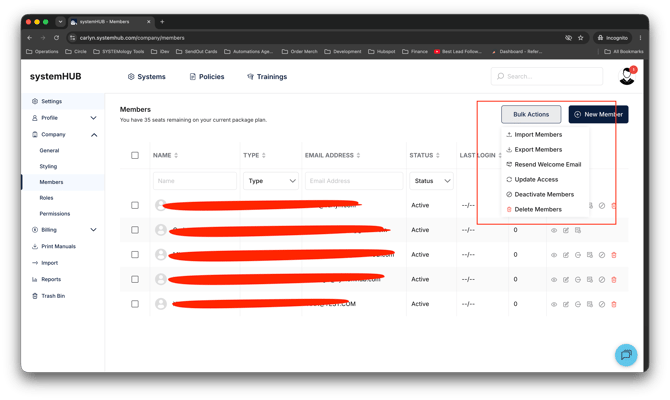
- Click Download template to get a CSV file pre-configured with the correct column headers.
- Open the file and fill in one row per team member with the following details:
- Email address (required)
- First name (required)
- Last name (required)
- Role (Admin / Editor / Contributor / Reader)
- Department (optional)
- Save your updated CSV file.
- Click Upload CSV inside systemHUB and choose your file.
- Review the on-screen preview, making sure to fix any errors flagged by the system.
- Click Confirm.
Welcome emails will automatically go out to every successfully imported team member.
🛠️ Troubleshooting common CSV Errors
If your import encounters an issue, look out for these common errors:
- Duplicate email: The member already exists in your workspace. You must either skip that row or update the existing member profile manually.
- Invalid role: The Role column must match the system terms exactly:
Admin,Editor,Contributor, orReader. - Missing required field: Every single row must contain a valid email, first name, and last name to be processed.
🚀 Next Steps After Import
Once your import is complete, finish setting up your team with these final checks:
- Head to Settings -> Team to confirm everyone arrived correctly.
- Review who landed in which role to ensure correct access levels.
- Begin assigning relevant systems and documentation to your new users.
💡 Pro Tip: For accounts of 50+ users, run your import in smaller batches of 25 to make troubleshooting much easier if any data errors pop up.
🎉 You're All Set!
You have successfully mass-boarded your team into systemHUB. Everyone will receive their welcome invitations automatically, allowing them to jump straight in and access your company's operational knowledge base.