![1000X162.png]](https://kb.systemology.com/hs-fs/hubfs/1000X162.png?width=250&height=43&name=1000X162.png)
📂 Establish Your Root Folders
When you first set up systemHUB, you are provided with standard departmental folders. To maintain a clean organisation, use these as your "Root" or top-level categories.
- Navigate to the top of the sidebar.
- Click New -> Folder to add a new department.
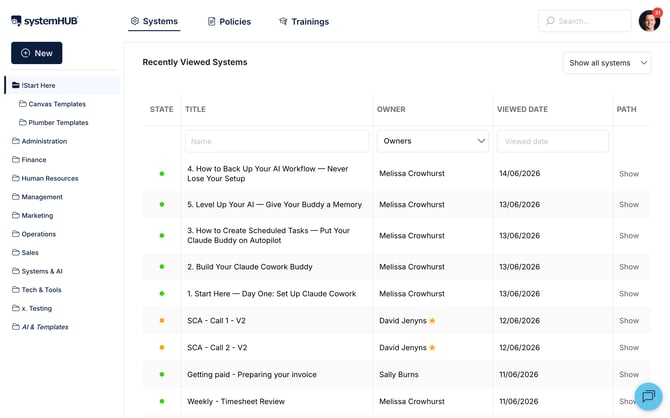
💡 Pro Tip: Use a numbering system (e.g., "08 Test Folder") to keep your main departments in a specific, logical order.
🗂️ Create Subfolders for Specificity
As a department grows, avoid having a long, flat list of systems. Instead, group related processes into subfolders to make them easier to navigate.
- Right-click on a main folder (e.g., "Marketing").
- Select New Folder.
- Name your subfolder to match its specific function (e.g., create a "Social Media" subfolder inside "Marketing" to house all your platform-specific processes).
🔄 Move and Organise Content
To keep your workspace tidy, you can move existing systems into your new subfolders using one of two methods:
- Move via Menu: Right-click a system, select Move, and then navigate to the specific subfolder (e.g., Marketing > Social Media).
- Drag and Drop: Click and hold a system, then drag it directly into a folder in your sidebar.
ℹ️ Relocation: If a different department takes over a task, you can move an entire folder to a new root category, such as moving "Social Media" from "Marketing" to "IT".
⚙️ Folder Maintenance
Keep your folder tree intuitive by right-clicking any folder to access these quick management tools:
- Rename: If a department name changes, right-click and select Rename.
- Duplicate: Copy an entire folder structure if you need to replicate it for another branch or department.
- Assign Members: Right-click a folder to quickly manage which team members have access to everything inside it.
🧠 Why Structure Matters
A disorganised systemHUB leads to "system overwhelm." If team members cannot find what they need at a glance, they will get frustrated, stop using the systems, and revert to old, inconsistent habits. Taking a few moments to structure your folders ensures long-term team adoption.
🎉 You're All Set!
You now have the tools to build a clean, well-structured knowledge base. Organising your root folders and subfolders makes it incredibly easy for your team to find the exact processes they need, right when they need them.