---
title: Creating Systems, Folders, and Subfolders
description: Ready to start adding content to your systemHUB account? Begin by creating systems, folders, and subfolders to keep everything organized.
---
[Skip to content](https://kb.systemology.com/help-center/creating-systems-folders-and-subfolders#main-content)
English
Show submenu for translations
![1000X162.png\]](https://kb.systemology.com/hs-fs/hubfs/1000X162.png?width=250&height=43&name=1000X162.png)
Open main navigation
Close main navigation
- English
Show submenu for translations
- [www.systemHUB.com](https://www.systemhub.com/)
[www.systemHUB.com](https://www.systemhub.com/)
How can we help?
- There are no suggestions because the search field is empty.
1. [Help Center](https://kb.systemology.com/help-center?hsLang=en)
2. [Building Content](https://kb.systemology.com/help-center/building-content?hsLang=en)
# Creating Systems, Folders, and Subfolders
## Learn how to navigate your systemHUB workspace, build a clean folder hierarchy for your departments, add nested content, and understand the permission levels required to make structural changes.
### **🧭 Navigate Your Workspace**
The left-hand side panel is your main navigation hub. This is where you toggle between the three primary content sections:
- **Systems**: For "how-to" processes.
- **Policies**: For company rules and guidelines.
- **Training**: For educational courses and workshops.
---
### **📁 Create a Top-Level (Root) Folder**
Root folders are typically used to represent your main company departments, such as Finance, Marketing, or Operations.
1. Click the **New** button in the top left corner of the screen.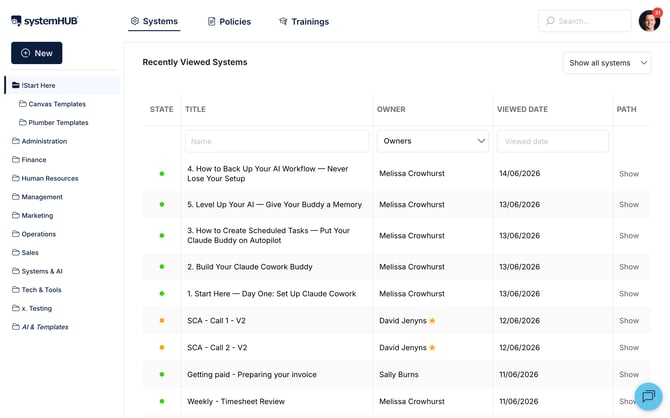
2. Select **New Folder**.
3. Enter a name for your department, for example, "Marketing".
4. Click **Add**. The folder will now appear in your left-hand panel.
---
### **🌿 Add Subfolders and Content**
Once your root folders are set up, you can build out your hierarchy using one of two methods:
- **Method A (Right-Click)**: Right-click on any folder and select **New Folder** or **New System/Policy/Training**.
- **Method B (Toolbar)**: Click to highlight a folder, then click the **New** button at the top and select your desired item.
For example, to organise your marketing department:
1. Right-click **Marketing** and add a subfolder named **Social Media**.
2. Right-click **Social Media** and select **New System** to create a specific process like **Facebook Posting**.
---
### **📝 Name and Save Your Content**
When creating a new system, policy, or training:
1. Enter a clear, descriptive **Title**.
2. Click **Publish** (or **Save**).
3. Your new content will now be nested precisely where you created it in the folder tree.
---
### **🛠️ Troubleshooting Permissions**
If the **New** button is missing or you cannot right-click to add items, your user access level may be restricted.
> 🚫 **Note**: Only users with Admin or Editor permissions can create or modify folders and systems. If you are a Reader, contact your systemHUB admin to request an access update.
---
### **🎉 You're All Set!**
You now know how to map out and organise your company knowledge base like a pro. Building a clean folder structure makes it effortless for your team to find the exact processes they need, when they need them!
- [Getting Started](https://kb.systemology.com/help-center/getting-started?hsLang=en)
- [Profile & Settings](https://kb.systemology.com/help-center/profile-settings?hsLang=en#main-content)
- [Profile Setup & Onboarding](https://kb.systemology.com/help-center/profile-settings?hsLang=en#profile-setup-onboarding)
- [Account Security & Access](https://kb.systemology.com/help-center/profile-settings?hsLang=en#account-security-access)
- [Notifications & Preferences](https://kb.systemology.com/help-center/profile-settings?hsLang=en#notifications-preferences)
- [Admin & Billing](https://kb.systemology.com/help-center/admin-billing?hsLang=en#main-content)
- [Team & User Management](https://kb.systemology.com/help-center/admin-billing?hsLang=en#team-user-management)
- [Subdomain & Organization Settings](https://kb.systemology.com/help-center/admin-billing?hsLang=en#subdomain-organization-settings)
- [Billing & Subscriptions](https://kb.systemology.com/help-center/admin-billing?hsLang=en#billing-subscriptions)
- [Permissions & Roles](https://kb.systemology.com/help-center/permissions-roles?hsLang=en)
- [Building Content](https://kb.systemology.com/help-center/building-content?hsLang=en)
- [Working With Content](https://kb.systemology.com/help-center/working-with-content?hsLang=en#main-content)
- [Tagging & Organization](https://kb.systemology.com/help-center/working-with-content?hsLang=en#tagging-organization)
- [Content & Collaboration Tools](https://kb.systemology.com/help-center/working-with-content?hsLang=en#content-collaboration-tools)
- [Limits & Specifications](https://kb.systemology.com/help-center/working-with-content?hsLang=en#limits-specifications)
- [Training](https://kb.systemology.com/help-center/training?hsLang=en)
- [Reports & Compliance](https://kb.systemology.com/help-center/reports-compliance?hsLang=en)
- [Integrations & API](https://kb.systemology.com/help-center/integrations-api?hsLang=en)
- [Troubleshooting](https://kb.systemology.com/help-center/troubleshooting?hsLang=en#main-content)
- [Technical Requirements & Compatibility](https://kb.systemology.com/help-center/troubleshooting?hsLang=en#technical-requirements-compatibility)
- [Cache, Performance & Errors](https://kb.systemology.com/help-center/troubleshooting?hsLang=en#cache-performance-errors)
- [Status, Requests & Affiliate Program](https://kb.systemology.com/help-center/status-requests-affiliate-program?hsLang=en#main-content)
- [Affiliate Program](https://kb.systemology.com/help-center/status-requests-affiliate-program?hsLang=en#affiliate-program)
- [Legal & Security](https://kb.systemology.com/help-center/legal-security?hsLang=en#main-content)
- [Policies & Terms](https://kb.systemology.com/help-center/legal-security?hsLang=en#policies-terms)
[](https://www.SYSTEMology.com/)
Copyright © 2026, SYSTEMology / systemHUB