![1000X162.png]](https://kb.systemology.com/hs-fs/hubfs/1000X162.png?width=250&height=43&name=1000X162.png)
🔑 Prerequisite
To generate a Master Document List in systemHUB, ensure you have access to your account's Settings and Reports areas.
📋 What an MDL Is and Why an Auditor Asks for One
A Master Document List is a single register of every controlled document in your management system, showing, for each one, what it is, which version is current, who owns it, when it was approved, and when it is next due for review.
It is the document that lets an auditor answer one question quickly: "Can this organisation prove it knows which version of each document is the live one?"
❓Is It Actually Mandatory?
No, and it is worth being straight about this. Neither ISO 9001 nor ISO 27001 contains a clause that says "you must maintain a master document list". What they require is control of documented information:
- ISO 9001:2015, clause 7.5: Documented information must be approved before use, identifiable by its current revision status, available where it is needed, and protected from the unintended use of obsolete versions.
- ISO 27001:2022, clause 7.5: Every ISMS document must have a defined lifecycle: creation, ownership, version, access, review, approval, and controlled disposal. Each document has a named owner formally accountable for keeping it reviewed and current.
An MDL is simply the most common and most auditable way of demonstrating that control. An auditor cannot read your intentions; they read your register. So while the list is not the requirement, it is usually the evidence.
The practical version: if you cannot produce, on request, a list showing every document with its version, owner, approval date and review date, you will struggle to demonstrate clause 7.5, whichever standard you are being audited against.
📊 What an MDL Must Contain
At minimum, one row per controlled document with:
| Column | Why the Auditor Cares |
|---|---|
| Document ID | A stable identifier that survives renaming |
| Document title | What it is |
| Version | Which revision is current, the core of clause 7.5 |
| Date approved | Proof it was approved before use |
| Next review date | Proof review is scheduled, not accidental |
| Owner | The named person accountable (both standards require this) |
| Secondary owner | Continuity when the owner is unavailable |
| Approver | Separation between who writes and who signs off |
| Status | Draft / current / superseded / archived, this is how obsolete versions are prevented from being used |
| Audit history | Evidence the lifecycle was followed, not just declared |
| Document URL | So the auditor can open the document itself from the register |
🚀 How to Produce Your MDL in systemHUB
systemHUB generates this list for you. You do not need to build or maintain a spreadsheet by hand, which matters, because a hand-maintained register drifts out of date and a drifted register is worse than none.
- Navigate to Settings -> Reports in your systemHUB account.
- Choose the export / master document list report type.
- Select what you want included, Systems, Policies, or Trainings.
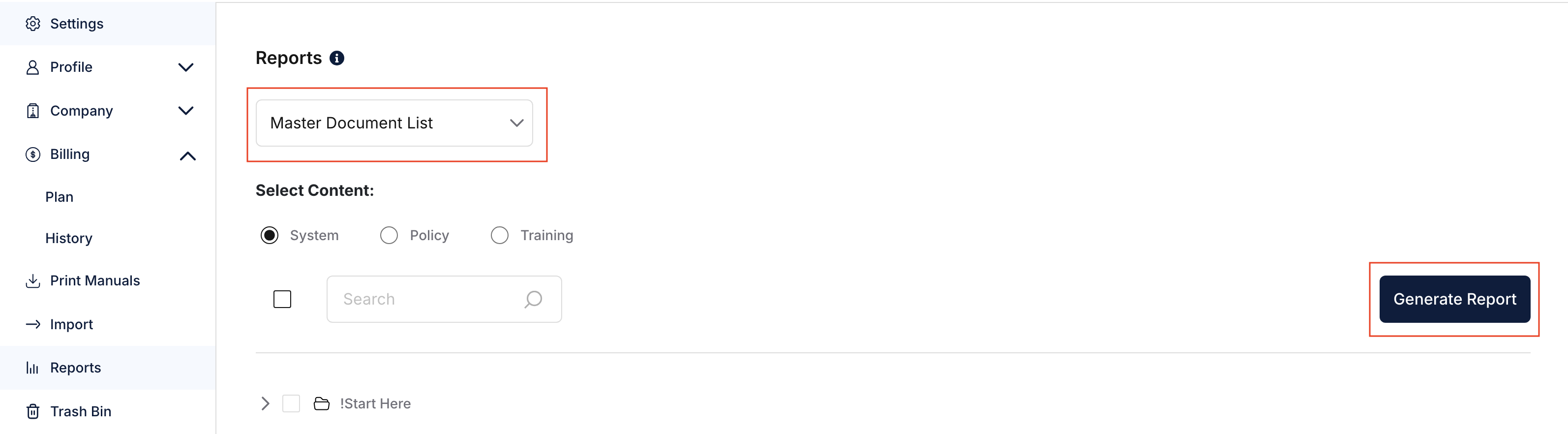
- Generate the report view first. Check on screen that the scope and the row count look right before you export anything.
- Export to spreadsheet.
- Save the exported file with the date in the filename, e.g. MDL-2026-09-07.xlsx. Auditors ask when the register was produced.
⚠️ Important: Export as .xlsx, not .csv. The document links are only clickable in .xlsx. CSV does not support URL fields, so a CSV export gives you the addresses as plain text and an auditor cannot click through to the document. This is a known limitation, confirmed by the development team on 21 July 2026, not a bug to report.
💡 Using It Properly Once You Have It
Producing the file is the easy half. These are the habits that survive an audit:
- Regenerate it, don’t edit it: The exported file is a snapshot. If something is wrong, fix it in systemHUB and export again. An edited export is no longer evidence of anything.
- Produce a fresh one for each audit, and keep the previous ones: The series shows control over time, which is more convincing than a single current file.
- Check every row has an owner: A blank owner is the single most common clause 7.5 finding, in both standards.
- Check the review dates: A register full of overdue review dates demonstrates that your review process is not running, it can be worse than having no register at all.
- Watch the status column: Superseded documents should be visibly superseded. Clause 7.5 explicitly targets the unintended use of obsolete documents.
🎉 You're All Set!
You now have a clean, auditable Master Document List ready for your ISO compliance review. Keep your records updated in systemHUB, re-export fresh reports before audits, and you will easily satisfy clause 7.5 requirements!